
Linux containers on your Mac, without Docker Desktop.

Irekobox is a free, open-source Mac app for Apple’s container. Run containers, Compose projects, Linux machines and Kubernetes clusters, each in its own lightweight virtual machine.

For Macs with Apple silicon and macOS 26 or later.

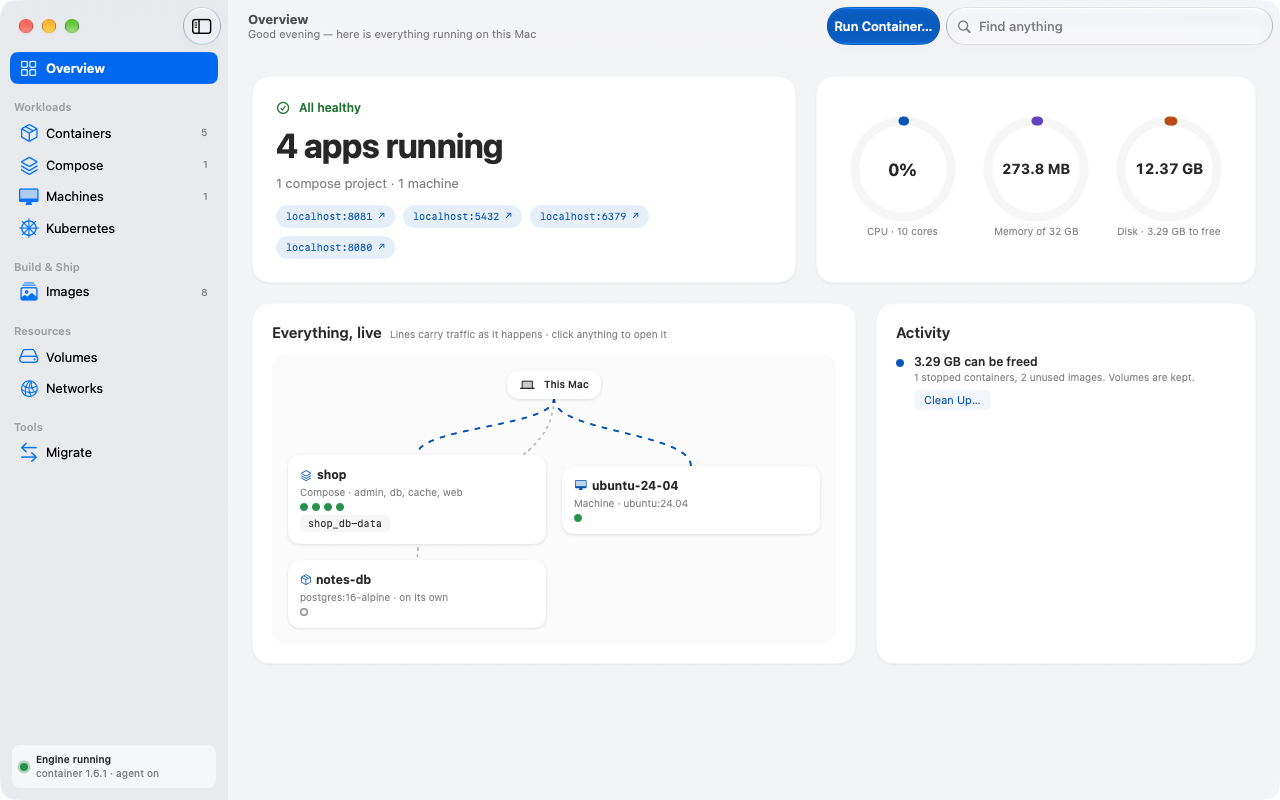
Irekobox Overview: four apps running, a compose project, a Linux machine and a live map of what talks to what

What you used Docker Desktop for, as a Mac app.

Apple’s container runs each container in a virtual machine of its own, isolated and quick to start. It comes as a command-line tool. Irekobox gives it a window.

A container on one page

Logs that keep up with a hundred thousand lines, a terminal, the container’s files with Quick Look, and live charts of CPU, memory and network.

Change a port or a variable and Irekobox recreates the container for you. The old one stays until the new one is running.
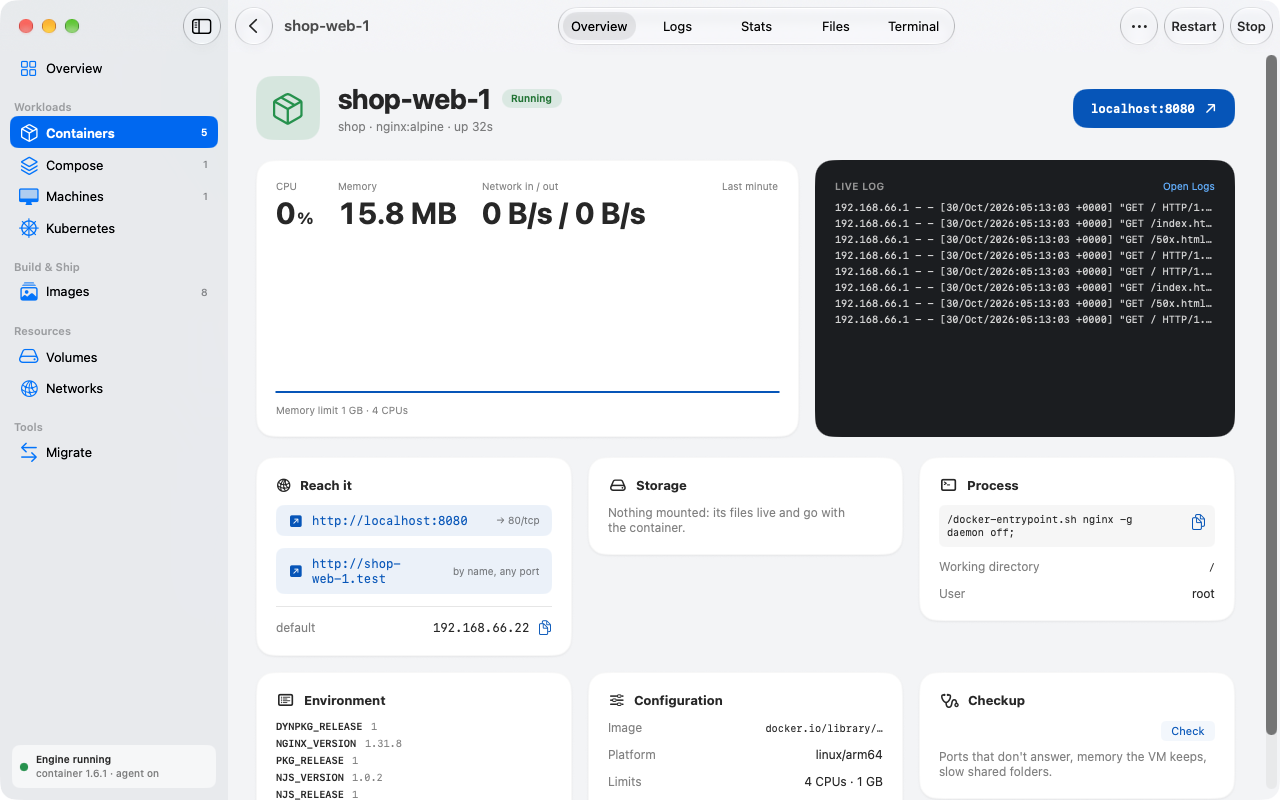
A container page: CPU and memory, a live log, addresses, environment and configuration

Compose projects, explained

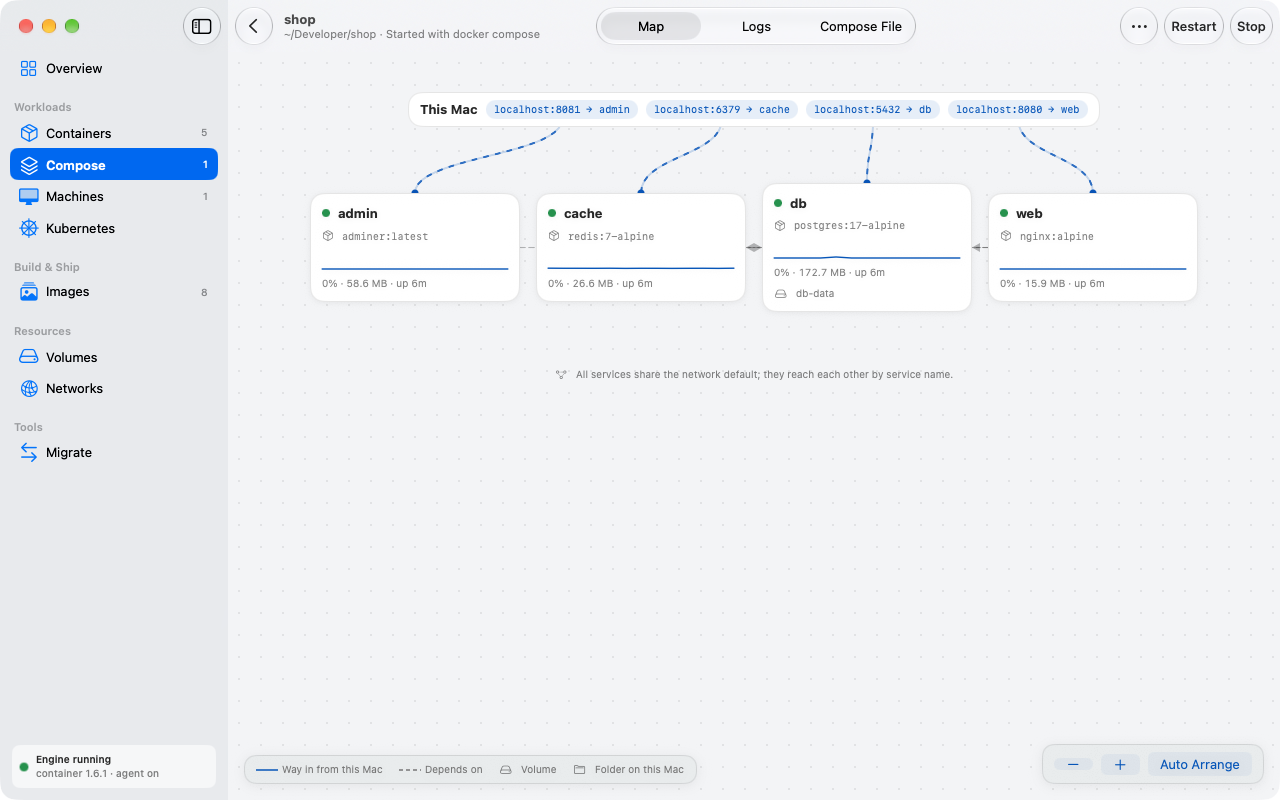
Open a folder with a compose.yaml. Irekobox draws the services, their ports and what waits for what, and before the first start tells you what works as is, what it fixes for you and what container can’t do yet.

A Compose project drawn as a map of services, ports and dependencies

Linux machines with your home folder

Ubuntu, Debian, Fedora or Alpine with your account and your files, a click away. Open a terminal and work as if Linux were installed on the Mac.

A Kubernetes cluster on your Mac

Create a local cluster, add it to your kubeconfig, load the images you built and run an app without writing YAML.

Your Docker tools keep working.

Irekobox answers the Docker API on a socket of its own. Switch the context and the docker command, Compose, Testcontainers and Dev Containers run on Apple’s container, with no Docker Desktop behind them.

Moving over? Irekobox brings your images, volumes, registry logins and Compose projects from Docker Desktop.

  • docker CLI
  • docker compose
  • Testcontainers
  • Dev Containers
$ docker context use irekobox
$ docker compose up -d
 ✔ Container shop-db-1   Healthy
 ✔ Container shop-web-1  Started
$ docker run -it --rm alpine sh

And the small things.

Keeps running with the window closed

A background agent restarts containers by their restart policy and brings them back when you log in.

In the menu bar

Engine status, CPU and memory, running apps with links to their ports.

Tells you when something breaks

A notification when a container stops unexpectedly, turns unhealthy or has a newer image.

Command palette

Press ⌘K to jump to any container, image or project, or to run an action.

For your AI assistant

A built-in MCP server lets coding assistants read logs and manage containers, asking before anything is deleted.

Nothing to install by hand

Irekobox installs and updates Apple’s container for you and starts the engine.

Questions

Is Irekobox free?

Yes. Irekobox is free and open source under the Apache License 2.0, for personal and company use.

Do I need Docker Desktop?

No. Irekobox runs containers with Apple’s container, an open-source tool from Apple. Docker Desktop doesn’t need to be installed.

Will my docker commands still work?

Yes. Turn on the Docker API in Irekobox and run docker context use irekobox. The docker command-line tool, Docker Compose, Testcontainers and Dev Containers then run on Apple’s container. The docker command itself is installed separately, for example with Homebrew.

Which Macs does it run on?

Macs with Apple silicon and macOS 26 or later. Apple’s container doesn’t run on Intel Macs.

How is it different from Docker Desktop?

Docker Desktop runs every container in one shared Linux virtual machine. Apple’s container gives each container a lightweight virtual machine of its own, so containers are isolated from each other. Irekobox is a native Mac app built on it.

Can I move my setup from Docker Desktop?

Yes. Irekobox brings over your images, volumes, registry logins and Compose projects, and tells you what can’t move.

Does Irekobox collect any data?

No. There are no analytics and no account. It goes online only to check for updates, to search Docker Hub when you search for an image, and to talk to the registries you use.

The Irekobox icon: an open box with a smaller box inside

Why Irekobox

Ireko-bako are Japanese nesting boxes: each holds a smaller one.

Irekobox puts your app in a container, the container in a small Linux VM, and the VM in your Mac.

Get Irekobox

Free and open source under the Apache License 2.0. Signed and notarized by Apple; it updates itself.

What you need

  • A Mac with Apple silicon
  • macOS 26 or later
  • Apple’s container 1.6 or later. Irekobox installs it if it’s missing.

Support Irekobox

Irekobox is free and stays free. If it saves you time, a donation pays for the hours that go into it.

Sponsor on GitHub